
go-size-analyzer
Key Takeaways
Use go-size-analyzer to visualize your Go binaries and identify large dependencies.
Regularly analyze your binaries during development to catch size issues early.
Consider refactoring or replacing large packages to optimize binary size.
Leverage the WebAssembly version for quick analysis without local setup.
Integrate binary size analysis into your CI/CD pipeline for continuous optimization.
The Problem
As Go applications grow in complexity, understanding the size of compiled binaries and their dependencies becomes crucial for performance optimization and resource management. Large binaries can lead to increased deployment times and higher resource consumption, which can be particularly problematic in cloud environments where efficiency is key.
The Approach
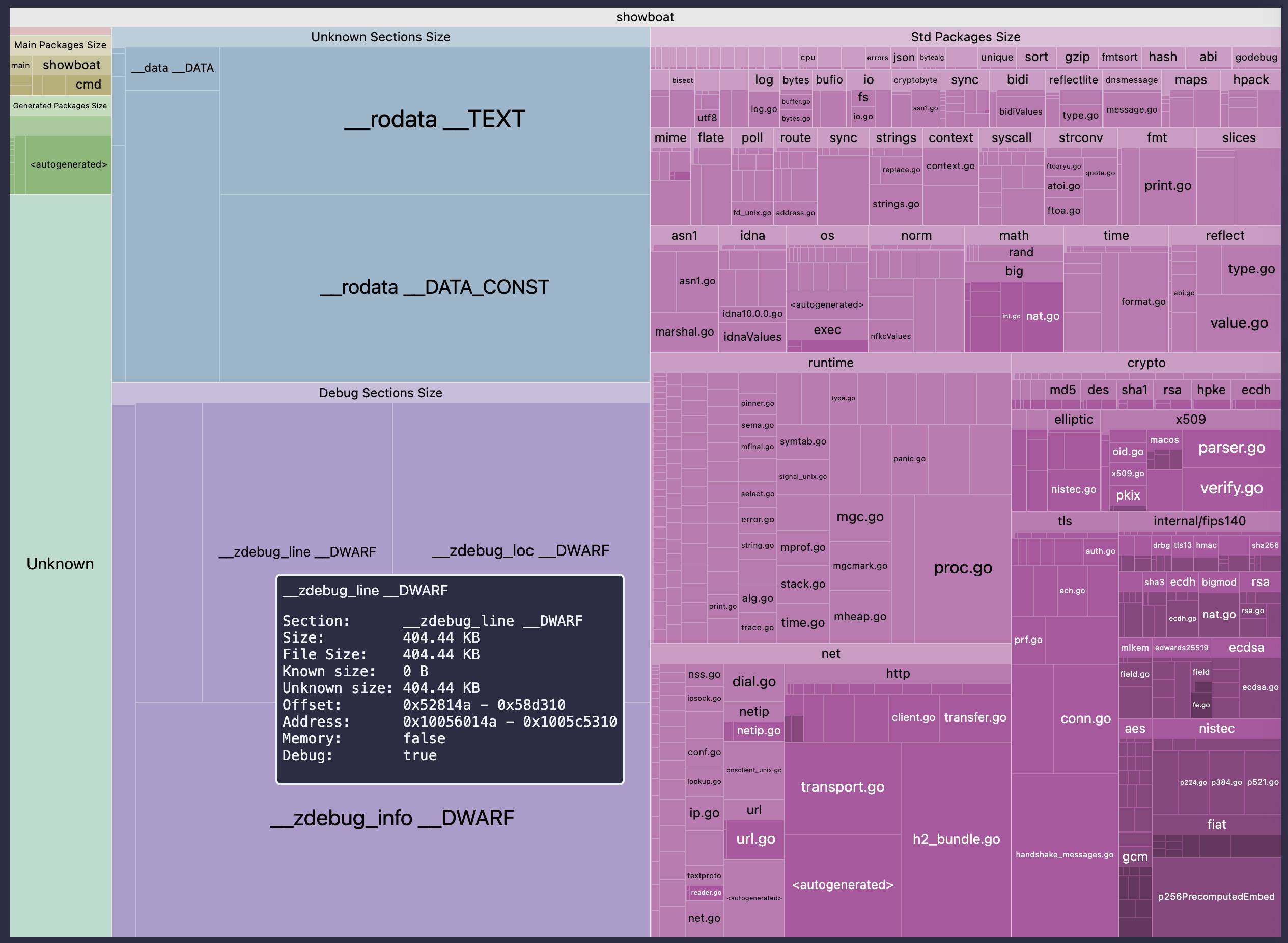
The go-size-analyzer tool addresses this issue by providing a visual representation of Go binaries and their dependencies through a treemap view. This allows developers to quickly identify which parts of their application contribute most to the binary size, enabling targeted optimizations.
Installation and Setup
To get started with go-size-analyzer, you can either install it locally or use the WebAssembly version hosted at gsa.zxilly.dev. For local installation, you can use the following command:
go get github.com/simonw/go-size-analyzer
Once installed, you can run the tool against your compiled Go binaries by executing:
go-size-analyzer path/to/your/binary
This will generate a visual output that you can analyze.
Using the Tool
After running the tool, you will see a treemap representation of your binary's dependencies. Each box in the treemap corresponds to a package, with the size of the box indicating the size of the package in the binary. This visual format makes it easy to spot large dependencies at a glance. For example, if you notice that a particular package is disproportionately large, you might consider refactoring your code to reduce its size or replacing it with a lighter alternative.
Interpreting the Results
Understanding the output of go-size-analyzer is key to making informed decisions about your Go applications. Look for packages that take up a significant portion of your binary size. You can also compare the sizes of different builds or versions of your application to see how changes in code affect the overall size. This iterative process can lead to significant improvements in your application's performance and deployment efficiency.
Key Takeaways
- Use go-size-analyzer to visualize your Go binaries and identify large dependencies.
- Regularly analyze your binaries during development to catch size issues early.
- Consider refactoring or replacing large packages to optimize binary size.
- Leverage the WebAssembly version for quick analysis without local setup.
- Integrate binary size analysis into your CI/CD pipeline for continuous optimization.
Why it matters
Understanding binary size and its dependencies can significantly enhance your application's performance and deployment efficiency. Mastering tools like go-size-analyzer not only improves your technical skills but also positions you as a proactive developer focused on optimization.
Get your personalized feed
Trace curates the best articles, videos, and discussions based on your interests and role. Stop doom-scrolling, start learning.
Try Trace free